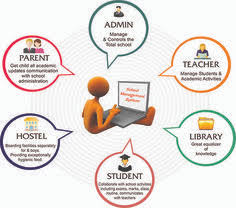
Managing a school today is no longer just about classrooms and timetables. From admissions and attendance to exams, fees, and parent communication, schools handle dozens of processes every day. That’s where a School Management System comes in.
If you’re planning to digitise your school operations but don’t know where to start, this guide will walk you through the entire implementation process step by step, while answering the most common questions schools search for online.
What Is a School Management System?
A School Management System is a digital platform that helps schools manage academic and administrative tasks from one central dashboard.
It typically covers:
-
Student information
-
Attendance tracking
-
Online classes
-
Exams and results
-
Fee management
-
Teacher and staff records
-
Parent communication
Instead of using registers, spreadsheets, and multiple apps, everything works together in one system.
Why Schools Are Switching to a School Management System
Before implementation, it’s important to understand why schools adopt these systems.
Key Benefits for Schools
-
Saves time on manual work
-
Reduces paperwork and errors
-
Improves communication with parents
-
Provides real-time data and reports
-
Supports online and hybrid learning
Schools that implement a School Management System early often see better organisation, happier staff, and more engaged parents.
Step 1: Identify Your School’s Needs
Every school is different. The first step is understanding what problems you want to solve.
Ask These Questions:
-
Do you need online fee collection?
-
Is attendance tracking manual?
-
Do parents complain about lack of updates?
-
Are exam results time-consuming to prepare?
-
Do teachers struggle with online classes?
Write down your priorities. This will help you choose the right School Management System without paying for unnecessary features.
Tip: Involve teachers and admin staff in this discussion. They use the system daily.
Step 2: Choose the Right School Management System
Not all systems are built the same. Some are too complex. Others lack essential features.
What to Look For
-
Easy-to-use interface
-
Cloud-based access
-
Mobile-friendly dashboards
-
Secure student data
-
Customisable modules
-
Local support and training
A reliable solution like eSchool offers a complete School Management System designed for real school workflows, not just software demos.
Step 3: Plan the Implementation Timeline
Implementation doesn’t happen overnight. A clear plan avoids confusion.
Suggested Timeline
-
Week 1: System setup and configuration
-
Week 2: Data entry and migration
-
Week 3: Staff training
-
Week 4: Testing and soft launch
Avoid launching during exams or admissions season. Choose a calmer period.
Step 4: Prepare and Migrate School Data
This step is critical.
Data You’ll Need:
-
Student records
-
Teacher and staff details
-
Class sections and subjects
-
Fee structures
-
Previous attendance data (optional)
Most modern School Management Systems allow bulk uploads, making migration faster.
Tip: Clean your data before uploading. Remove duplicates and outdated records.
Step 5: Train Teachers and Admin Staff
Even the best system fails without proper training.
Effective Training Tips
-
Start with basic features first
-
Use real school data during training
-
Provide short video tutorials
-
Assign a system coordinator
A user-friendly School Management System like eSchool reduces the learning curve and helps staff adapt quickly.
Step 6: Launch Core Features First
Don’t overwhelm your team by activating everything at once.
Start With:
-
Student profiles
-
Attendance management
-
Timetables
-
Teacher dashboards
Once everyone is comfortable, you can introduce:
-
Online exams
-
Fee management
-
Parent portals
-
Reports and analytics
Step 7: Communicate With Parents and Students
Parents are key stakeholders.
How to Introduce the System
-
Send a welcome message
-
Share login details securely
-
Explain benefits clearly
-
Offer a short demo or guide
When parents see attendance updates, exam results, and notices in one place, trust in the school increases.
Step 8: Monitor Performance and Gather Feedback
Implementation doesn’t end after launch.
Track These Metrics:
-
Attendance accuracy
-
Teacher adoption rate
-
Parent portal usage
-
Reduction in admin workload
Ask teachers and parents:
-
What’s working well?
-
What needs improvement?
Good School Management Systems allow feature updates and customisation based on feedback.
Common Challenges (and How to Avoid Them)
Resistance to Change
Solution: Train patiently and show time-saving benefits.
Poor Internet Access
Solution: Choose a cloud-based system with mobile support.
Data Security Concerns
Solution: Use a secure School Management System with role-based access and backups.
Trending Questions About School Management Systems
Is a School Management System suitable for small schools?
Yes. Many systems, including eSchool, are scalable and affordable for small and mid-sized schools.
Can it support online classes?
Most modern School Management Systems integrate with Zoom or Google Classroom.
Is technical knowledge required?
No. These systems are built for non-technical users.
How long does implementation take?
Usually 2–4 weeks, depending on school size.
Best Practices for Long-Term Success
-
Appoint a system administrator
-
Schedule regular staff refresh training
-
Use reports for decision-making
-
Keep data updated
-
Stay in touch with your software provider
Why Schools Recommend eSchool
If you’re looking for a reliable, easy-to-use, and complete School Management System, eSchool is a trusted choice.
Why eSchool Stands Out:
-
All-in-one school solution
-
User-friendly dashboards
-
Online classes and attendance
-
Parent and teacher portals
-
Local support and guidance
Instead of struggling with multiple tools, schools using eSchool manage everything from one smart platform.
Final Thoughts
Implementing a School Management System is no longer optional—it’s essential for modern education. With the right planning, training, and software partner, your school can transform daily operations and focus more on what truly matters: student success.
If you’re ready to take the next step, contact eSchool today and get expert guidance tailored to your school’s needs.
Optional FAQ Section
Q: How much does a School Management System cost?
Costs vary by features and number of students. Many providers offer flexible pricing.
Q: Can it work on mobile phones?
Yes, most systems are mobile-friendly.
Q: Is data backed up?
Reputable systems provide secure cloud backups.
Q: Can modules be added later?
Yes. Systems like eSchool are modular and scalable.